Free web tool · For Behance
Put videos and photos side by side on Behance.
Behance Grid is a free tool that lays out photos, videos and text in a single grid you can embed in your Behance project. Vertical videos no longer fill the whole screen on their own. You build the layout you want.
- Free
- No sign-up
- Files stay in your browser
- EN / TR interface
In short
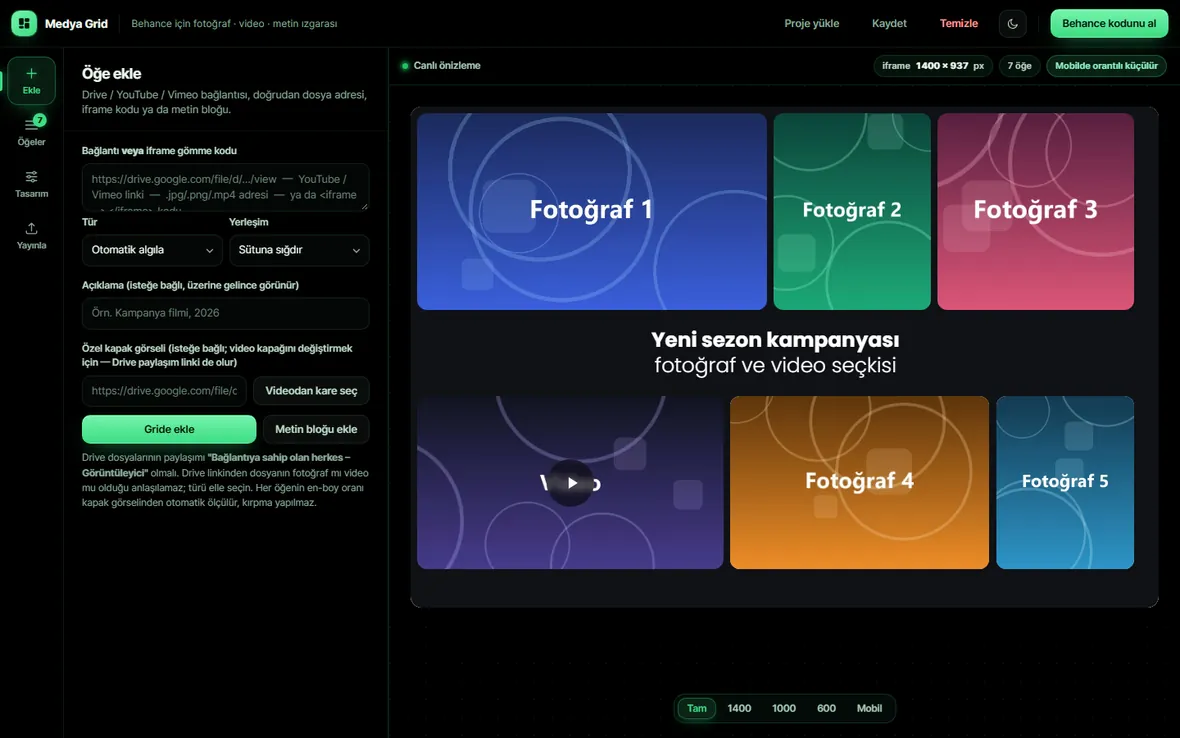
Behance Grid is a free web tool made by Kadir Apak. Behance’s built-in Photo Grid module only accepts images, and videos are always shown at full project width, so you can’t put a video next to a photo on Behance. Behance Grid solves this: it arranges photos and videos from Google Drive, YouTube, Vimeo or direct file links in Behance-style rows (or masonry columns), adds text blocks between rows, and lets you set the background colour, gaps and corner radius. The finished grid is published for free with Google Apps Script and pasted into Behance’s Embed module as an iframe.
- What it does
- Shows videos, photos and text in one grid inside a Behance project
- Price
- Free, no account or sign-up
- Sources
- Google Drive, YouTube, Vimeo, .jpg / .png / .mp4 URLs, iframe code
- Layouts
- Rows (like the Behance grid) or columns (masonry)
- Adding to Behance
- Publish with Google Apps Script → paste the iframe into Behance’s Embed module
- Privacy
- Nothing is uploaded to a server; everything runs in your browser
- Made by
- Kadir Apak, Art Director (Istanbul)
Why I built it
My vertical videos looked huge on Behance, on their own.
When you add a video to Behance, it takes the full width of the project. That’s fine for a landscape commercial, but the 9:16 vertical videos I make for social media filled the entire screen on their own, stretched the page down and just didn’t look good.
Behance has a grid feature, but it only puts photos side by side. You can’t place a video next to a photo, or two vertical videos next to each other. For campaign work that’s exactly what I needed: the post, the story video and the banner of one campaign, together.
So I built this tool. On one grid I can place photos, videos and text in between, give the page a background colour, and finally embed all of it in my Behance project with an iframe code. It’s how I publish my own work now.
— Kadir Apak · Art Director, Motion & Graphic Designer
Comparison
Behance’s own modules vs Behance Grid.
| Feature | Behance (default) | Behance Grid |
|---|---|---|
| Photos side by side | Yes (Photo Grid) | Yes |
| A video next to a photo | No | Yes |
| Two or more videos side by side | No | Yes |
| Showing a vertical (9:16) video smaller | No, always full width | Yes, fits the row by ratio |
| Text inside the grid, between rows | No | Yes |
| Grid background colour, gaps and corner radius | Limited | Fully adjustable |
| Drive / YouTube / Vimeo sources | Only one embed at a time | All in the same grid |
| Click to enlarge (lightbox) | Images only | Photos and videos |
Live example
The Petkit Türkiye campaign, built with Behance Grid.
The grid below is the same one that’s live inside my Petkit Türkiye project on Behance. It was made with Behance Grid and embedded in the Behance project with an iframe. Click a video to play it.
- Vertical videos side by side
- A photo and a video in the same row
- Several photos in one row
- Text headings between rows
How it works
A video grid on Behance in 5 steps.
Nothing to install, no account to create. Open the tool, paste your links, build the grid and embed it in Behance.
- 01
Add your links
Paste a Google Drive, YouTube or Vimeo link, a direct .jpg / .png / .mp4 URL or an iframe code. The type is detected automatically and each item’s aspect ratio is measured from its cover, so nothing is cropped. Drive files must be shared as “Anyone with the link – Viewer”.
- 02
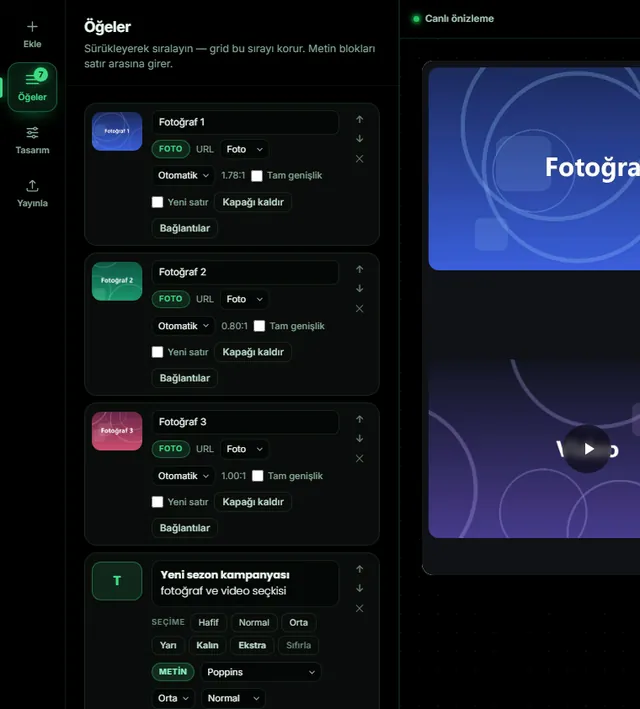
Drag to reorder
Reorder items with drag and drop. Make an item full width, or start it on a new row. Add captions and custom covers to videos, or grab a frame from the video as its cover.
- 03
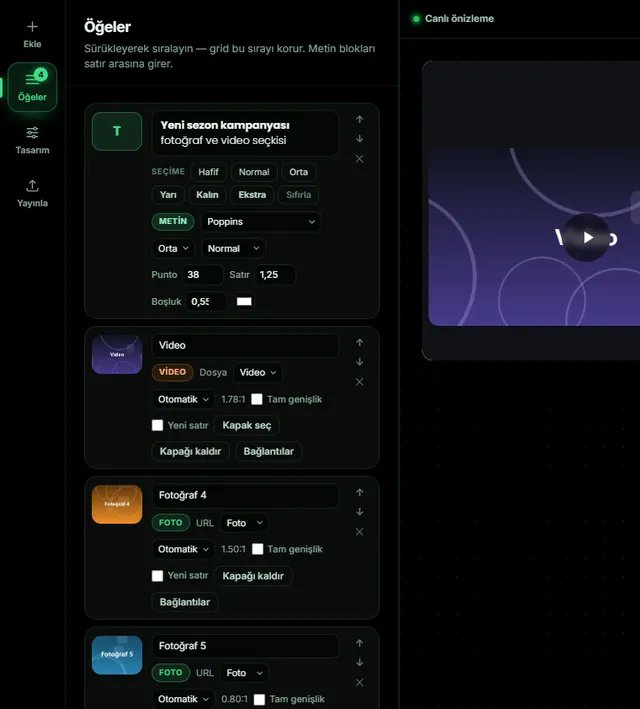
Add text between rows
Insert heading and description blocks between rows, great for separating parts of a campaign or telling the story of the project.
- 04
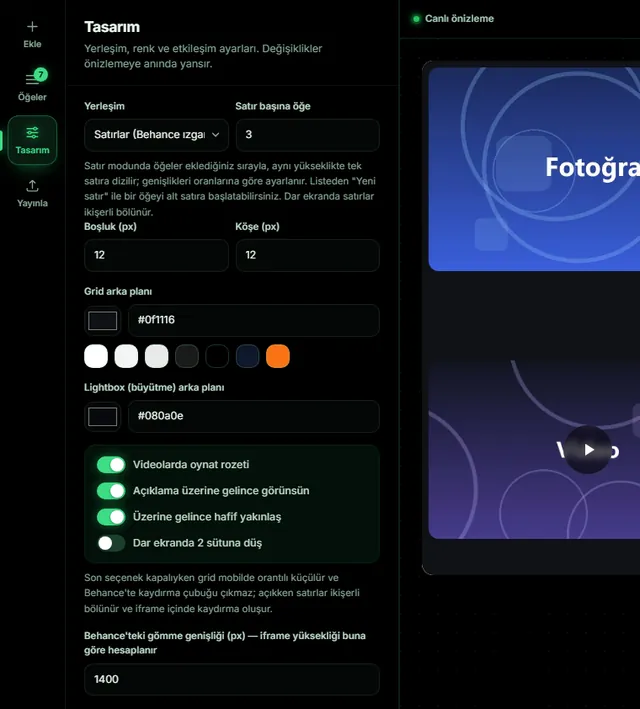
Tune the design
Pick rows (like the Behance grid) or masonry columns; set items per row, gap, corner radius, and grid and lightbox background colours. Changes show instantly, and you can check the grid at 1400, 1000, 600 px and mobile widths.
- 05
Publish and embed in Behance
Copy the grid’s HTML, publish it for free as an Apps Script web app with your own Google account, and paste the iframe code into the Embed module of the Behance project editor. The tool walks you through every step with screenshots.
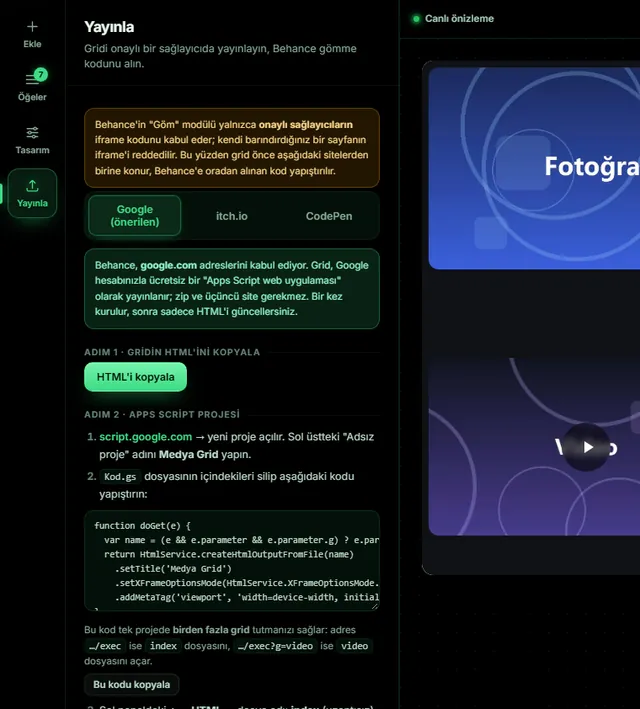
Embedding in Behance
Why Google Apps Script?
Behance’s Embed module only accepts iframe code from approved providers. An iframe pointing to a page you host yourself is rejected. Behance accepts google.com addresses, so the grid is published for free as an Apps Script web app with your own Google account.
One Apps Script project can hold several grids (for example …/exec?g=campaign).
When you change the grid, deploy a “New version”. The code on Behance stays the same and the grid updates.
itch.io works as an alternative. CodePen and self-hosted addresses are rejected by Behance.
On mobile the grid scales down proportionally and no scrollbar appears inside Behance. You can also choose to split rows into two columns on narrow screens.
Features
Everything your Behance project needs.
Video + photo in one grid
YouTube, Vimeo and Drive videos next to photos in the same row, with their ratios intact.
Behance-style rows
Items fill rows at equal height, widths follow their aspect ratios. Or switch to masonry columns.
Text blocks
Headings and descriptions between rows, so you can build a story around the project.
Colour and spacing control
Grid and lightbox background, gap and corner radius. Match your Behance project exactly.
Lightbox and play badge
Click to enlarge, a play icon on videos, captions and a subtle zoom on hover.
Cover from video
Use any frame of the video as its cover, or add your own cover image.
Save and load
Download your project as .json and pick up where you left off, even if the browser storage is cleared.
Mobile ready
The grid scales down proportionally on phones and looks right in the Behance app.
Who it’s for
Anyone who shares video on Behance.
Motion designers
Present animations, loops and vertical reels as one presentation, not one by one.
Graphic designers
Show campaign visuals, animated posts and banners together in one grid.
Video editors & photographers
Combine edits, behind-the-scenes clips and photo series in one flow.
Agencies & students
Show every output of a campaign in a clean, professional case study layout.
FAQ
Questions about video grids on Behance.
How do I put videos and photos side by side on Behance?
+
You can’t with Behance’s own modules: the Photo Grid only accepts images and videos are added at full width. With Behance Grid you arrange photos and videos in one grid, publish it with Google Apps Script and paste the iframe code into Behance’s Embed module. The video and photo then appear in the same row.
Can I add a video to Behance’s Photo Grid module?
+
No. Behance’s Photo Grid only lays out images; you can’t add videos or YouTube/Vimeo links to it. To show videos and photos in a mixed grid you need an embedded iframe made with a tool like Behance Grid.
Why do vertical (9:16) videos look so big on Behance?
+
Behance fits every video to the full width of the project. A vertical video shown at full width becomes several screens tall. In Behance Grid, vertical videos sit in a row with other items, keeping their ratio, so they appear at a normal size, and you can put two or three vertical videos side by side.
Is Behance Grid free? Do I need an account?
+
It’s completely free and needs no account. To publish, you only need your own Google account (Apps Script is free too).
Which video and image sources are supported?
+
Google Drive share links, YouTube, Vimeo, direct .jpg / .png / .webp / .mp4 file URLs and iframe embed codes. Drive files must be shared as “Anyone with the link – Viewer”.
Are my files uploaded to a server?
+
No. The tool runs entirely in your browser. You don’t upload files; you use links to files you’ve already shared. Your project is kept in the browser and you can download it as a .json file.
Behance says “This embed code is not valid”. What should I do?
+
Behance only accepts iframe code from approved providers. Publish the grid with Google Apps Script (script.google.com) or itch.io; CodePen and self-hosted addresses are rejected. The tool’s Publish step shows how, with screenshots.
I changed the grid but Behance still shows the old one.
+
After saving the new HTML in Apps Script, deploy a new version via Deploy → Manage deployments → Version: New version. A “New deployment” creates a new address, and the code on Behance keeps showing the old grid.
How does the grid look on mobile and in the Behance app?
+
By default the grid scales down proportionally on phones and no scrollbar appears inside Behance. You can also choose to split rows into pairs on narrow screens.
Can I add text inside the grid?
+
Yes. You can add text blocks with a heading and description between rows, to separate parts of a campaign or credit the software and team.
Can I publish several grids with one Google account?
+
Yes. Add several HTML files to one Apps Script project and open each with a …/exec?g=filename address. You can use a separate grid for every Behance project.

Made by
I’m an Istanbul-based Art Director and motion & graphic designer with 11 years of experience, making campaigns, social media, video and 3D work for brands. I built Behance Grid to solve a problem I had while publishing my own portfolio, and released it for free so every designer can use it.
Send feedback or report a bugRelated post
How to create a compelling Behance case study
Take your Behance project to the next level.
Open the tool and build your first grid in a few minutes. Free, no sign-up.
Open Behance GridLast updated: